Inside the Recruiter Screening Queue: A Real Look at How Resumes Are Read
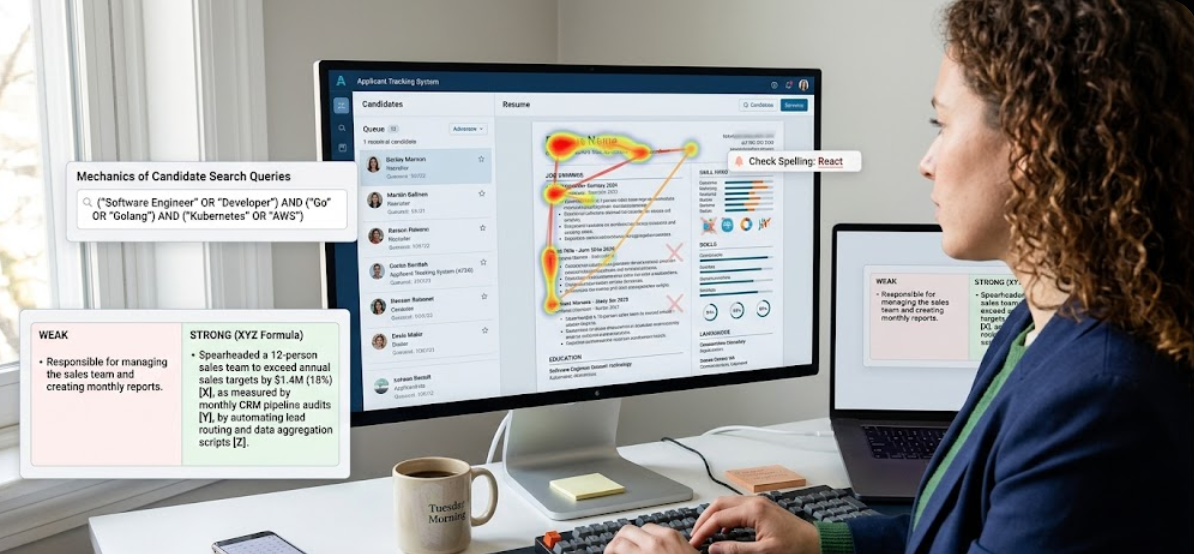
Observations on how recruiters skim resumes, why brand shortcuts are overvalued, and what actually happens when we look at your past jobs.
When you apply for a job online, your resume lands in a massive digital database—often alongside four hundred other files for a single opening. When I open my screening queue, I am not looking for reasons to hire you yet. Honestly, I'm trying to filter my way down to a manageable shortlist of candidates to call.
The reality is that recruiters rarely screen resumes manually at the very start anymore. Because a single job opening easily attracts thousands of resumes, clearing the initial database scanner is absolutely vital. Only the resumes that successfully pass the automated checks are watched and selected for an HR call.
When the HR recruiter does give you a call, they are checking more than just technical lines on a page—they are looking at your overall personality, communication, engagement, and how you present yourself. If they like you, they will package your resume and send it along to the actual interviewer or technical hiring team.
If I read every single line of every resume, I'd never get anything else done. So I do a very fast scan. This initial glance takes about six to eight seconds. My eyes jump in a quick pattern across the top third of the page and down the left margin, looking for job titles, employer names, and employment dates.
Recruiters look for anchors to help them make sense of your career path quickly. We look at your current job title first because it tells us if your experience level matches the role we are filling.
We also look at where you worked. In the recruiting world, working at a well-known competitor or a highly respected brand acts as a strong indicator of trust. It's not always fair, but brand recognition makes a resume stand out in a sea of unknown names.
If you worked at smaller or lesser-known companies, you can solve that with extra context right in your job headers. For example, instead of just listing an unknown startup name, write:ACME CORP (High-scale B2B SaaS platform handling $50M+ ARR) | Software EngineerThat extra context helps provide the proof of scale that a big brand name usually does automatically.
When I skim down your list of past roles, I rarely make it to the fourth or fifth bullet point. I read the first few words of the first bullet. Because of this fast sweep, you need to put your most impressive achievements at the very beginning of the sentence rather than burying them at the end.
"Managed a team of twelve sales associates to help grow the business and exceed targets by $1.4M."
"Grew sales pipeline by 18% ($1.4M ARR) by leading a team of 12 sales associates."
That version is easier to notice quickly. This means even a fast skim captures what you actually did.
Recruiters calculate gaps chronologically. Gaps of one to three months between jobs are completely normal and nobody cares about them. If you have a longer gap, just write a simple one-line explanation right in your experience timeline, like "family sabbatical" or "full-time technical study." That completely explains it.
Early in my career, I had eighteen months of actual experience at a company, but I wrote "2 years" on my resume because I thought a round number looked better. When the HR recruiter checked my employment records during the background screen, they saw the discrepancy immediately.
That discrepancy looked like a trust issue, and they rejected me right away. Always write down your exact, honest dates.
I used to think my resume was perfectly fine as it was. I scanned it and got a score of 77, and I figured that would be plenty good enough. But I barely got any responses or interviews.
Once I fixed my basic layout structure and aligned my keywords, raising my score from 77 to 82, the difference was night and day—I suddenly started getting noticed and received real interview callbacks.
The resumes that stay in my queue are always the ones that are simple to read. You don't need design tricks or shortcuts. Write down what you did, use exact dates, and lay it out in a plain column from top to bottom. It saves time for the person reading it, and that's usually enough.
Skimming Resumes
People read resumes very fast. Putting your biggest achievements right at the start of your bullets ensures they get noticed immediately.
- Layout is simple
- Context for smaller roles
- Wins written first
- Honest dates