The Technical Reality of ATS Ranking.
It’s not just about "beating a bot." It’s about ensuring your data is clean enough for a recruiter to actually find it in their database.
I’ve spent a lot of time looking at how resumes are actually processed on the backend of systems like Workday, Taleo, and Greenhouse. The most frustrating thing I see is a highly qualified candidate who becomes "invisible" simply because their data was garbled during extraction.
When you upload your resume, the system doesn't "read" it like a human. It tries to convert your document into a structured profile—like a LinkedIn page. If this conversion fails, you don't necessarily get "rejected," but you might end up ranked so low that no human ever clicks on your name. This guide breaks down the real technical barriers you need to clear.
1. The Extraction Barrier: PDF isn't always Text
A common mistake is assuming every PDF is equal. Resumes exported from graphic tools like **Canva or Figma** often fail because the text is stored as a layer of coordinates rather than a standard text stream. If the ATS uses a basic OCR (Optical Character Recognition) engine, it might see your resume as an image or a jumble of random characters.
Pro-Tip: The Notepad Test
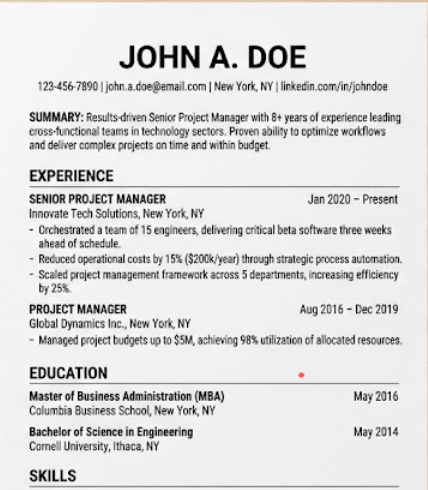
To see exactly what the machine sees, copy all the text from your resume and paste it into a plain Notepad file. If the words are merged together, or if your contact info is missing, your resume is technically broken. This is the version that ends up in the recruiter's search results.
Legacy systems like **Workday** and **Taleo** are particularly sensitive. They often ignore information placed in **Headers or Footers** of a Word document. If your name and phone number are in the header, the recruiter might see a "Perfect Profile" but have zero way to contact you.
2. Why "Infographic" Resumes Fail
We all want our resumes to stand out, but icons, rating bars (e.g., "Python: 4/5 stars"), and complex charts are unreadable to a parser. The system sees the icon as a "noise character" and the rating bar as empty space.
Consistency is key here. Use professional, standard fonts (like Arial, Calibri, or Roboto) and keep your alignment left-justified. Centralizing everything or using non-standard spacing might look good, but it breaks the "bounding boxes" the parser uses to identify where one job ends and the next begins.
3. Logic Errors: How Machines Count Experience
Date Consistency
If you use "Jan 2020" in one section and "01/20" in another, the parser may fail to calculate your total years of experience. This could lead to you being filtered out of "Senior" roles because the system thinks you only have 2 years of experience instead of 10. Stick to a single format throughout.
The Page Count Rule
Keep it to **1-2 pages**. While a 3rd page won't always crash a system, it often indicates a lack of conciseness that recruiters dislike during the initial triage. Longer resumes also increase the chance of parsing errors or data "timing out" during extraction.
Protecting Your Privacy & Compliance
Modern ATS systems are often configured for GDPRO or EEO compliance. Including a **picture, date of birth (DOB), or marital status** can actually cause your resume to be auto-rejected or hidden in some regions to prevent bias.
Recruiters don't need this information to evaluate your skills, and adding it only clutters the data mapping. Stick to the essentials: Name, Location, Phone, and Email.
4. Understanding the Ranking Threshold
It’s a myth that all companies have a "hard filter" at 80%. Instead, recruiters use the ATS as a search engine. They type in **Boolean strings** like: `("Software Engineer" OR "Developer") AND "React" AND "AWS"`.
The system then ranks candidates based on how well their data matches those criteria. If you hit a "benchmark" score of 80+ in our tool, it essentially means you have fulfilled the structural and contextual markers that would place you at the top of that search list. Higher ranking equals higher visibility, and higher visibility leads to that "6-second triage" where a human recruiter actually opens your file.
5. Keyword Context vs. Keyword Stuffing
Simply listing "Java, Python, C++" in a footer won't help you as much as you think. Modern parsers look for **contextual relevance**. If the system sees you used "Python" in the context of a "Data Pipeline Project" from 2022, it assigns a much higher weight to that skill than a random list in a skills section.
Fonts & Spacing
Use standard fonts and consistent 1-1.15 spacing. Non-standard margins can cause text to overflow and break line extraction.
Alignment
Left-alignment is the safest bet. It mirrors how legacy systems like Taleo read a document top-to-bottom.
No Graphics
Charts and rating bars are seen as white space. Use text to describe your proficiency levels instead.
By focusing on these technical nuances, you aren't just "playing the game"—you are ensuring that your professional history is delivered to the hiring manager exactly as you intended.
Is your data actually being read?
Use our scorer to run a "Technical Audit" of your resume. We’ll show you the extraction errors that might be making you invisible.