Recruiter-Verified Strategy

The Best Resume Format: Why Your Creative Layout is Getting You Rejected (And the Structure That Wins)

Stop designing for Pinterest. Start structuring for the recruiter's 6-second scan and the ATS's extraction logic.

Quick Answer: What is the best resume format?

The best resume format for 99% of candidates is the single-column, reverse-chronological layout. This structure is universally compatible with Applicant Tracking Systems (ATS) and aligns with how recruiters visually scan profiles. It prioritizes your most recent achievements, uses standard headings, and avoids complex design elements that scramble data extraction.

01The ATS Parsing Barrier: Why Most Resume Layouts Fail Automatically

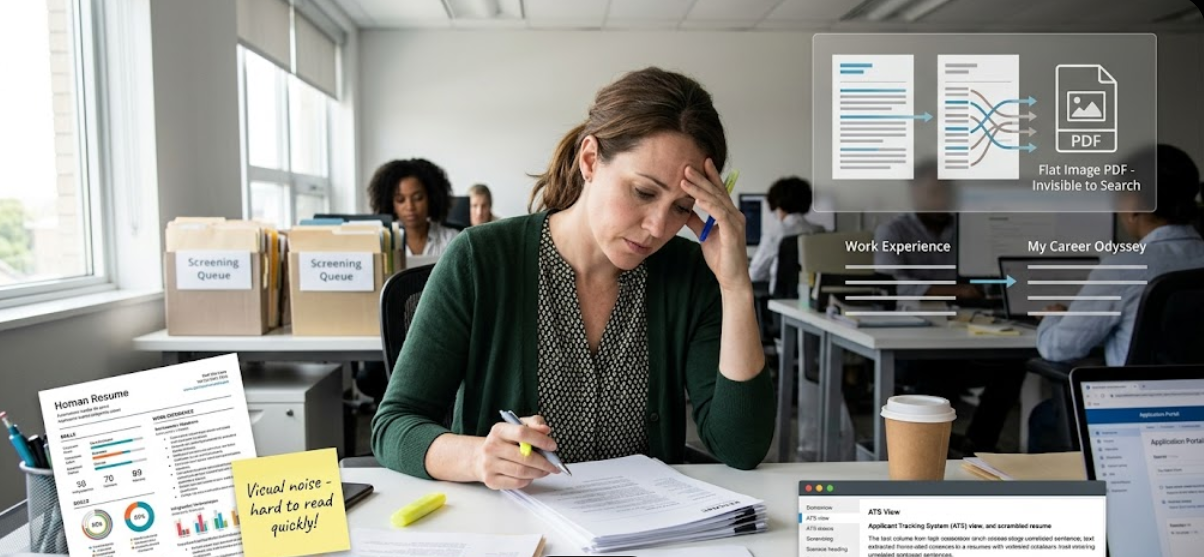
Before a human ever sees your resume, a robot reads the "code" of your file. Most candidates choose a resume layout based on aesthetics, but the ATS (Applicant Tracking System) judges you on data readability. If your format is too complex, the robot sees a blank page.

  • The Problem: Using tables, text boxes, or "creative" icons to represent skills.
  • Why it fails: ATS software reads left-to-right. In a multi-column format, it often reads across the columns, mixing your job titles with your hobby list into an unsearchable mess.
  • The Fix: Use a flat, text-based document. If you can't copy and paste the text into Notepad without it scrambling, your ATS resume format is broken.

Is your current format ATS-ready?

2. The Great Design Trap: Why Fancy Resume Formats Hurt Your Chances

Many job seekers use Canva or Photoshop to create "beautiful" resumes. This is one of the most common resume mistakes. In the world of high-level recruiting, structure matters infinitely more than design.

Design-Heavy Format (Fail):

"Headshots, skill bars, social media icons, and 3 different colors."

Signals: "Style over substance. Unprofessional."

Structure-Heavy Format (Win):

"Consistent fonts, clear headings, 1-inch margins, and 100% text."

Signals: "Organized, result-driven, and easy to read."

3. Single-Column vs. Multi-Column: Why Simple Layouts Win

Recruiters and robots both prefer a linear resume structure. Multi-column layouts are visually exhausting for humans and technically difficult for software.

  • Visual Load: A recruiter's eye naturally scans in an "F-Pattern" (Top, then left-to-right). A second column breaks this flow and forces them to work harder to find your value.
  • The "Hidden" Info: Information in the right-hand column of a resume is often ignored during the first 6 seconds of screening.
  • What to do: Put your most important achievements in the center of the page where they cannot be missed.

4. The Ideal Resume Structure: A Blueprint for the Top 1%

Success is found in the sequence. To how recruiters read resumes, you must place information in the order of their curiosity.

1. Header:

Name, professional email, phone, LinkedIn, and target job title.

2. Summary:

3 lines of impact (Years of exp + Niche + Top Achievement).

3. Skills:

A clean index of 10-12 hard skills matching the job description.

4. Experience:

Reverse-chronological results. 80% of your resume's value lives here.

5. Education:

Degree, University, and Graduation Year. Keep it at the bottom.

5. Best Resume Format for Freshers: How to Build Authority

If you are looking for a resume format for freshers, your goal is to bridge the experience gap with proof of potential.

What to Do:

Move "Projects" and "Education" above "Work Experience" if your internships are irrelevant. Highlight technical certifications and self-taught skills.

What to Avoid:

Using a "Functional" resume that hides dates. Recruiters see this as a red flag that you are hiding something.

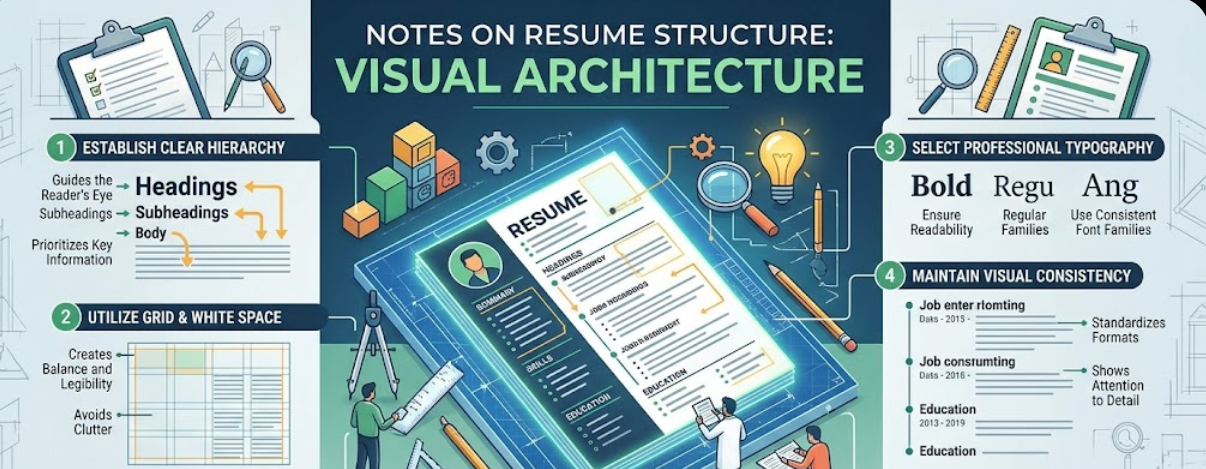
6. Visual Hierarchy: Using Formatting to Direct the Recruiter's Eye

Recruiters don't read; they "scan." You must use resume layout tricks to highlight your wins.

  • Bold the Result: Bold the metric at the start of the bullet. (e.g., "Grew revenue by 40% by...").
  • Standard Headings: Use "Work Experience," not "My Journey." Don't make the recruiter think.
  • White Space: Use 1.15 line spacing. A wall of text is an automatic "No."

7. The Science of the "ATS Resume Format" (MM/YYYY)

One of the biggest ATS mistakes is using non-standard date formats. If the robot can't read your dates, it can't calculate your total years of experience.

The "Literal" Rule:

Always use MM/YYYY (e.g., 05/2021 – Present). Avoid saying "Spring 2021" or "Two years ago." Robots don't understand seasons or relative time.

Create Your Top 1% Resume in Minutes.

Our builder uses the exact structure recommended by Fortune 500 recruiters.

8. Reverse-Chronological vs. Functional: The Final Verdict

Candidates often ask which best resume format to pick.

  • Reverse-Chronological: The Gold Standard. Preferred by 99% of recruiters and 100% of ATS systems. Best for everyone.
  • Functional (Skills-Based): The "Red Flag" Format. Used to hide gaps or hopping. Avoid this unless you are making a 180-degree career change.

9. Typography Resume Mistakes: Fonts That Kill Credibility

Your choice of font is a silent trust signal. Non-standard fonts often fail to parse in an ATS scan.

Avoid (Unreliable):

Times New Roman (outdated), Comic Sans (unprofessional), any script/handwriting font.

Use (Safe):

Calibri, Arial, Helvetica, Georgia, or Roboto. Stick to 10-12pt size.

10. Format Decision Guide: Fresher vs. Experienced Pro

Candidate TypePriority SectionRecommended Pages
FresherSkills & ProjectsStrictly 1 Page
Mid-Level (3-10yr)Work Experience1-2 Pages
Executive (10yr+)Strategic Impact2-3 Pages

The Ultimate Formatting Checklist for 2026

  • Single column layout verified.
  • Text is selectable (Not an image).
  • All headers use standard naming (Experience, Skills, Education).
  • Consistent date format (MM/YYYY).
  • 1-inch margins on all sides.

Format FAQ

Can I use a two-column resume for tech jobs?

While tech-savvy recruiters can read them, many legacy ATS systems still scramble them. Single-column is 100% safe; two-column is a risk.

Is PDF or Word better for formatting?

PDF is best for preserving your layout for human eyes. Word is slightly better for older ATS parsing. Modern systems handle both, but PDF is the industry standard.

Should I put a photo on my resume?

In the US and UK—Never. It triggers bias laws and can lead to automatic deletion by HR software.

How many bullet points per job?

Aim for 4-6 for your most recent role, and 2-3 for older roles. Quality of impact matters more than quantity of bullets.

Recruiter-Approved • Expert-Verified • High-Impact Content

© 2026 Resume Strategy Labs. Optimized for Success.