Why Your Resume Gets Rejected by ATS.
And the proven steps to fix it fast so you can start getting more interview calls today.
Applying for jobs online often feels like throwing your career into a dark room and hoping someone turns on the light. You spend hours tailoring your experience, only to hear nothing back. Most candidates assume they aren't "qualified enough," but the reality is much simpler: a computer program likely failed to read your file correctly, making you invisible to the recruiter before they even saw your name.
The Gap Between 77 and 82
I learned this the hard way through personal experience. For months, I was applying to dozens of companies with a resume that I thought was perfect. Our internal testing showed it had a score of **77**—which sounds decent, right? But the result was total silence. No interviews, no calls, just automated rejections. It wasn't until I sat down and truly cleaned up the layout—removing tables, fixing date formats, and making it "linear"—that my score hit **82**. The difference was night and day. Within two weeks of using that 82-score version, the interview calls started coming in, and I finally landed a job letter. That small 5-point jump wasn't about "better skills"; it was about finally becoming **visible** to the search filters recruiters use every day.
The Truth About "Scoring"
Recruitment software (ATS) is basically just a database with a search bar. When you upload a resume, a "parser" tries to break your document into pieces: Name, Phone, Last Job, Education, and Skills. If you use a two-column layout, the parser often reads horizontally across both columns, mixing your sentences into a jumbled mess. To the computer, you look like an unformatted error. When a recruiter searches their database for "Project Manager" or "React Developer," the system only shows them candidates whose data was extracted cleanly. If your data was garbled because of a table or a weird font, you simply don't show up in their search results. A score of 80+ generally means your data is "clean" enough to be indexed correctly, whereas a 70 means the machine is struggling to categorize your history.
Most "AI-powered" resume tools try to sell you on magic keywords, but that's only half the battle. If the recruiter's system can't tell where your last job ended and your education began because of a formatting glitch, no amount of keywords will save you. We focus on the structural integrity of the file—ensuring that every line of text is placed in a way that the most basic, outdated recruitment software can still understand without losing a single word of your experience.
Simple Rules That Get Interviews
Standardize your headers to avoid "mapping errors."
Don't use creative titles like "My Story" or "Where I've Been"; stick to "Work Experience" so the database knows exactly where to look for your tenure.
Use MM/YYYY date formats for accurate experience calculation.
If the system can't calculate that you have "5+ years of experience" because of a weird date format, you'll be filtered out of senior roles automatically.
Avoid icons and graphics—they are "noise" to a machine.
A phone icon looks like a broken character to a parser; just write "Phone:" or leave it blank with the number next to it for the best results.
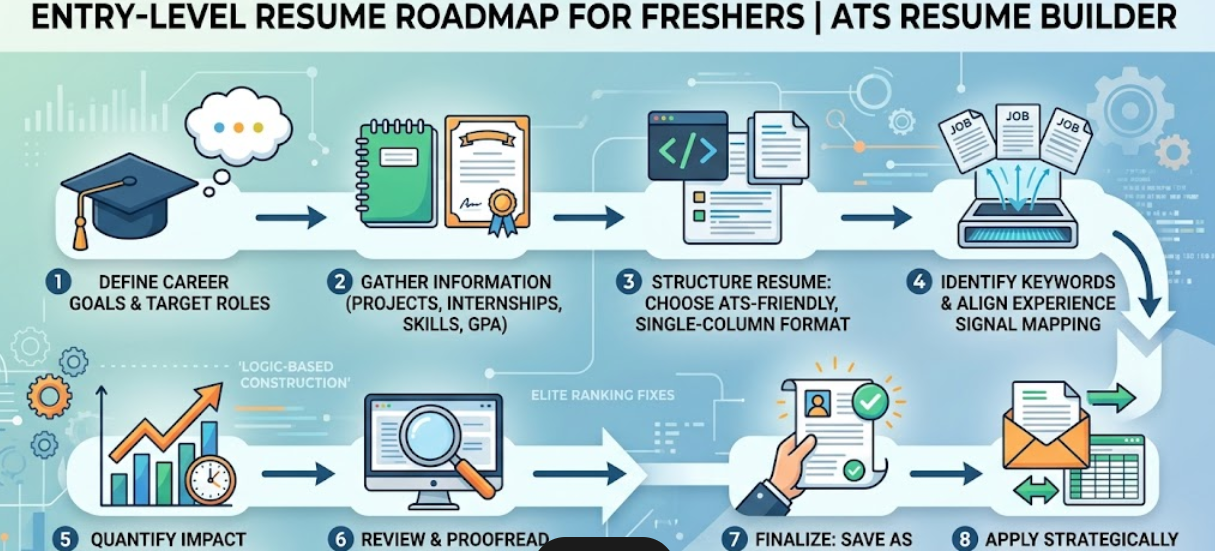
Single-column layouts are the only 100% safe bet.
While two columns look "modern" to humans, they are the #1 cause of data extraction failure in recruitment systems like Workday and Taleo.
The Hidden Technical Layer
Things even most resume "experts" don't know about how files are parsed.
- Internal Object Ordering: Some legacy parsers extract text based on the order it was created within the document's code rather than its visual position. If contact info was added last, it can occasionally cause data to be indexed out of sequence, potentially affecting how your profile is displayed.
- Character Encoding Inconsistencies: Using non-standard "curly" quotes (slanted quotes from mobile or Mac editors) can sometimes interfere with simple keyword matching in older databases. While modern systems handle this better, it can still lead to occasional indexing errors.
- Extraction Layer Offsets: If a PDF generator places a "text layer" behind a visual image, any slight technical offset can occasionally cause characters to overlap during extraction. This may affect the clarity of the resulting plain-text profile used for searches.
- Whitespace Discrepancies: Certain builders use "non-breaking spaces" to maintain layout. Some recruitment systems may treat these as unique characters, which can occasionally result in a search mismatch if the system isn't configured to recognize varied spacing.
- Encoding Conflicts: Including complex symbols or emojis may occasionally force a document into an encoding format that older enterprise systems struggle to decode. In rare cases, this can prevent the full career history from saving correctly to the recruiter's dashboard.
Stop Guessing and Start Getting Calls.
Our tool doesn't use "hacks." It just helps you build a resume that actually works in the real world of recruitment databases. Check your score today and make your experience visible.